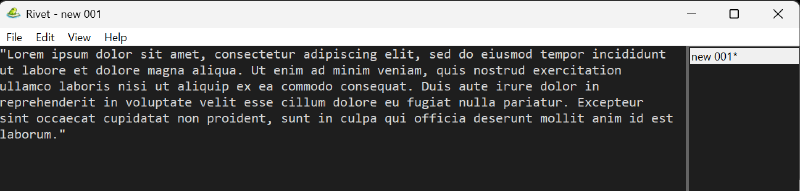
Overview
Rivet is a lightweight Windows-native text editor focused on fast startup and simple, clean behavior. The design goal is intentional: implement the core workflows deeply instead of relying on a large plugin surface.
It uses a native Win32 UI with a Scintilla editing engine, and it treats session integrity as a first-class feature.
The current v0.4.22 release has grown into a practical daily driver while keeping that original scope: native startup, predictable editing, local state, and no plugin platform to manage.
Why Rivet Exists
Modern “note apps” often drift into being mini platforms. Traditional editors can be powerful, but the experience is frequently shaped by plugin ecosystems, heavy frameworks, or brittle state.
Rivet aims for the opposite:
- Minimal visual noise with a practical status bar and focused menus
- Keyboard-driven flow and predictable behavior
- Recovery you can trust: periodic snapshots and crash-safe writes
If you want an editor that behaves like a tool (not a product suite), Rivet is meant to feel “quiet” in the best way.
Differentiators
1) Tabs that adapt to how you work
Rivet supports multi-document selection tabs with three placements:
Top(classic horizontal tabs)Left(vertical list)Right(vertical list)
The vertical tab panel is resizable and persists its width in both views.
Every tab has a close button, dirty-document state is visible in all placements, and Rivet remembers its window position, size, and maximized state across restarts. If a saved position no longer lands on a connected monitor, it falls back to the Windows default.
2) Session recovery and backups built-in
Rivet’s file/session safety includes:
- Session restore (open tabs + active tab tracking)
- Periodic backup snapshots for unsaved changes
- Crash-safe atomic writes for session and backup data
- Stale temp cleanup at startup
This is the “open your editor and keep going” promise without crossing your fingers.
3) “Complete” daily-driver navigation
Search and navigation are implemented as standard workflows would expect:
- Find/Replace (
Ctrl+F,Ctrl+H) with match case, whole word, regex, wrap - Replace All grouped into a single undo step
- Find next/previous (
F3/Shift+F3) - Go to line (
Ctrl+G) - Find in Files with cancel support
4) Real file handling and language support
Rivet detects and preserves UTF-8, UTF-8 BOM, UTF-16 LE/BE, and Windows-1252 files. The status bar reports the document’s actual encoding instead of the editor buffer’s internal code page.
It also includes:
- Syntax highlighting for JSON, XML, Python, PowerShell, YAML, HTML, CSS, C/C++, properties files, and Markdown
- Markdown heading folding that ignores headings inside fenced and indented code blocks
- A manual language override for untitled buffers or files with unusual extensions
- Recent Files with stale-entry cleanup
- Reload from Disk with an unsaved-changes confirmation
- Large File Mode to avoid expensive work on oversized documents
5) Windows shell integration
The installer can register Open with Rivet in Explorer and expose Rivet as a default-app choice for common text formats. From a terminal, rivet.exe <file> [more files] opens files as tabs.
Rivet runs as a single instance. Opening another file while it is already running forwards that file to the existing window and brings it to the foreground. Portable builds keep command-line and single-instance behavior without writing shell registration.
6) Small but high-leverage text tools
Built-in transforms and helpers (no plugin required):
- Dark Mode
- Word wrap and Always On Top
- Shared zoom across tabs, persisted between sessions
- Live word count
- Uppercase / Lowercase
- Trim leading + trailing whitespace
- Copy full path / filename / directory path
Quick Tour of Key Shortcuts
- New file:
Ctrl+N - Open:
Ctrl+O - Save:
Ctrl+S - Save all:
Ctrl+Shift+S - Close tab:
Ctrl+W - Cycle tab placement:
Ctrl+Alt+T - Find:
Ctrl+F - Replace:
Ctrl+H - Go to line:
Ctrl+G - Zoom in / out / reset:
Ctrl+=/Ctrl+-/Ctrl+0
Installation
Rivet offers both installer and portable builds via GitHub Releases:
- Installer:
rivet-<version>-setup.exe - Portable:
rivet-<version>-win64-portable.zip
Data and Configuration
Rivet stores state under %LOCALAPPDATA%\Rivet (fallback %APPDATA%\Rivet):
settings.json(UI settings such as theme, tab placement, vertical tab width, and zoom)sessions\session.json(remembered documents/session state)backup\*.bak(snapshot files)
Project Quality Notes
The project emphasizes maintainability:
- CI enforces formatting, linting, and tests
- Unit tests cover session, settings, text transforms, and command behavior
- Build metadata is embedded into
Help -> About Rivet