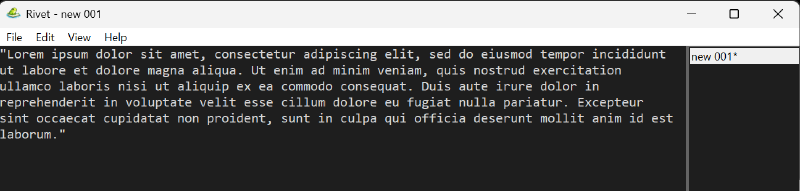
Overview
Rivet is a lightweight Windows-native text editor focused on fast startup and simple, clean behavior. The design goal is intentional: implement the core workflows deeply instead of relying on a large plugin surface.
It uses a native Win32 UI with a Scintilla editing engine, and it treats session integrity as a first-class feature.
Why Rivet Exists
Modern “note apps” often drift into being mini platforms. Traditional editors can be powerful, but the experience is frequently shaped by plugin ecosystems, heavy frameworks, or brittle state.
Rivet aims for the opposite:
- Minimal visual noise with a practical status bar and focused menus
- Keyboard-driven flow and predictable behavior
- Recovery you can trust: periodic snapshots + crash-safe writes
If you want an editor that behaves like a tool (not a product suite), Rivet is meant to feel “quiet” in the best way.
Differentiators
1) Tabs that adapt to how you work
Rivet supports multi-document selection tabs with three placements:
Top(classic horizontal tabs)Left(vertical list)Right(vertical list)
The vertical tab panel is resizable and persists its width in both views.
2) Session recovery and backups built-in
Rivet’s file/session safety includes:
- Session restore (open tabs + active tab tracking)
- Periodic backup snapshots for unsaved changes
- Crash-safe atomic writes for session and backup data
- Stale temp cleanup at startup
This is the “open your editor and keep going” promise—without crossing your fingers.
3) “Complete” daily-driver navigation
Search and navigation are implemented as standard workflows would expect:
- Find/Replace (
Ctrl+F,Ctrl+H) with match case, whole word, regex, wrap - Replace All grouped into a single undo step
- Find next/previous (
F3/Shift+F3) - Go to line (
Ctrl+G) - Find in Files with cancel support
4) Small but high-leverage text tools
Built-in transforms and helpers (no plugin required):
- Dark Mode
- Uppercase / Lowercase
- Trim leading + trailing whitespace
- Copy full path / filename / directory path
Quick Tour of Key Shortcuts
- New file:
Ctrl+N - Open:
Ctrl+O - Save:
Ctrl+S - Close tab:
Ctrl+W - Cycle tab placement:
Ctrl+Alt+T - Find:
Ctrl+F - Replace:
Ctrl+H - Go to line:
Ctrl+G
Installation
Rivet offers both installer and portable builds via GitHub Releases:
- Installer:
rivet-<version>-setup.exe - Portable:
rivet-<version>-win64-portable.zip
Data and Configuration
Rivet stores state under %LOCALAPPDATA%\Rivet (fallback %APPDATA%\Rivet):
settings.json(UI settings like tab placement and vertical tab width)sessions\session.json(remembered documents/session state)backup\*.bak(snapshot files)
Project Quality Notes
The project emphasizes maintainability:
- CI enforces formatting, linting, and tests
- Unit tests cover session, settings, text transforms, and command behavior
- Build metadata is embedded into
Help -> About Rivet